
You have scrolled through enough gaming setup photos to know the drill by now — the perfectly diffused RGB glow, the cable-free desk, the monitor arm that somehow never wobbles. And then you look at your own corner, with a power strip peeking out from under the desk and a chair that does not match anything, and it feels like everyone else got a manual you never received.
Here is the part nobody tells you: a lot of those setups are staged for exactly one photo angle. The cables are hidden because the camera never turns left. The lighting looks cinematic because the room lights are off and it is 11 PM.
This roundup is different. We are looking at ten real gaming setups and asking the question that actually matters — does this hold up when you are three hours into a ranked match at 2 PM with the blinds open? Some ideas here are genuinely worth copying. Others look incredible but come with a catch you will only discover after living with them. Let’s get into it.
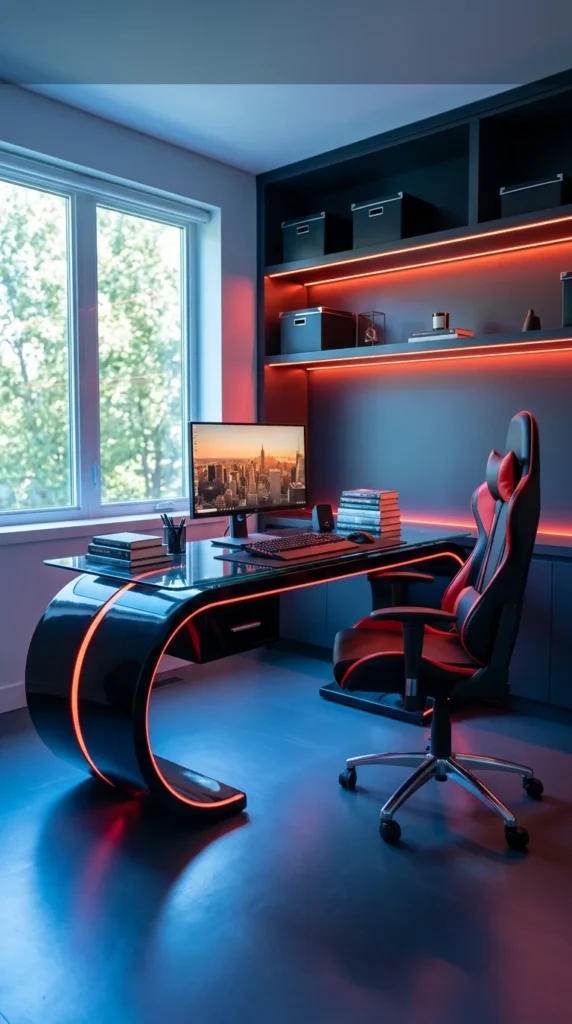
1. The Curved Desk With the Red Glow
That sculpted, wave-shaped desk is the kind of piece that stops your scroll immediately — but here’s the honest question first: would it still work at 9 AM with the blinds up? Actually, yes, and that’s what makes this setup smarter than it looks. Notice the window doing the real lighting work during the day, while the under-shelf LED strip and desk edge lighting are really built for the hours after sunset. The curved base isn’t just decoration either — it frees up floor space where a boxy desk would eat the corner. The one catch: a glossy, glass-top surface like this shows every fingerprint and dust speck under direct daylight, so if you’re precise about aesthetics, you’re wiping it down more than you’d expect. It’s a striking setup, but a high-maintenance one.
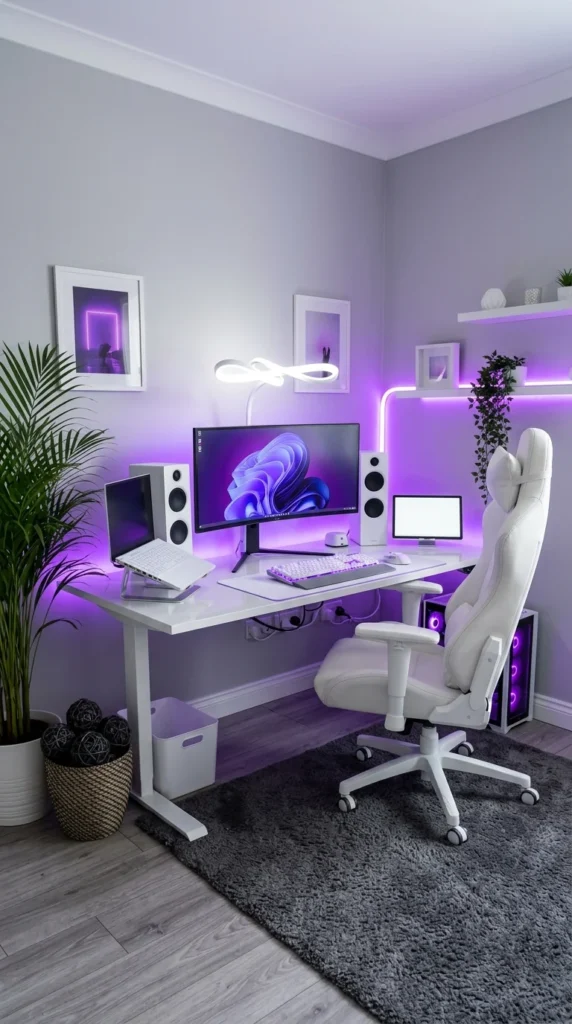
2. The All-White Corner Setup
Where the first setup leant into a bold single accent, this one goes the opposite direction — an all-white build with purple as the only colour statement, tucked into a corner instead of floating in the open. It works because of restraint, not decoration. Notice how the plant and woven basket soften what could easily feel like a sterile tech display — that’s a deliberate warmth layer against all the white plastic and glass. The standing desk frame and second small monitor also suggest this room does double duty: work by day, gaming by night. Here’s the real-life catch with white gear, though — it looks flawless on day one, but white keyboards and desks show grime and skin oil noticeably faster than dark or black finishes. If you’re not wiping this down weekly, that crisp look fades within a couple of months.
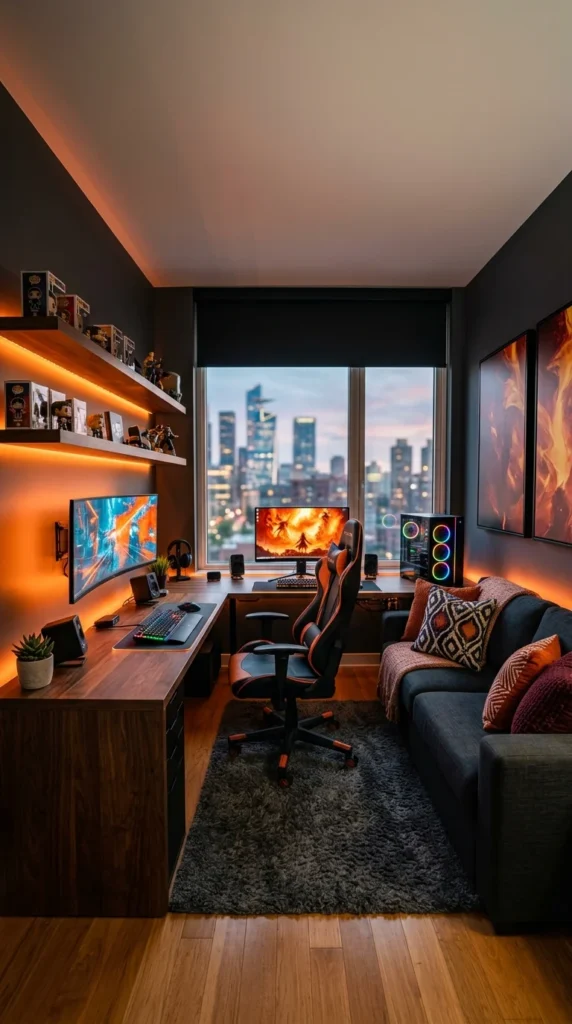
3. The L-Shaped Corner With City Views
Honestly, this is the setup I’d actually want to sit in. Where the first two rooms centred the desk as the main event, this one treats gaming as just one part of a lived-in room — there’s a couch, throw pillows, and a rug doing as much visual work as the RGB tower. The warm wood tone against the orange under-shelf lighting is a smart pairing too, since it reads cosy instead of clinical, unlike the cooler blues and purples in the earlier setups. The Funko/collectible shelf is doing double duty as storage and personality without cluttering the desk itself. One real consideration, though: an L-shaped desk this size eats a serious footprint in a small room, and if your space isn’t already this generous, you’ll be sacrificing the couch entirely to fit it.
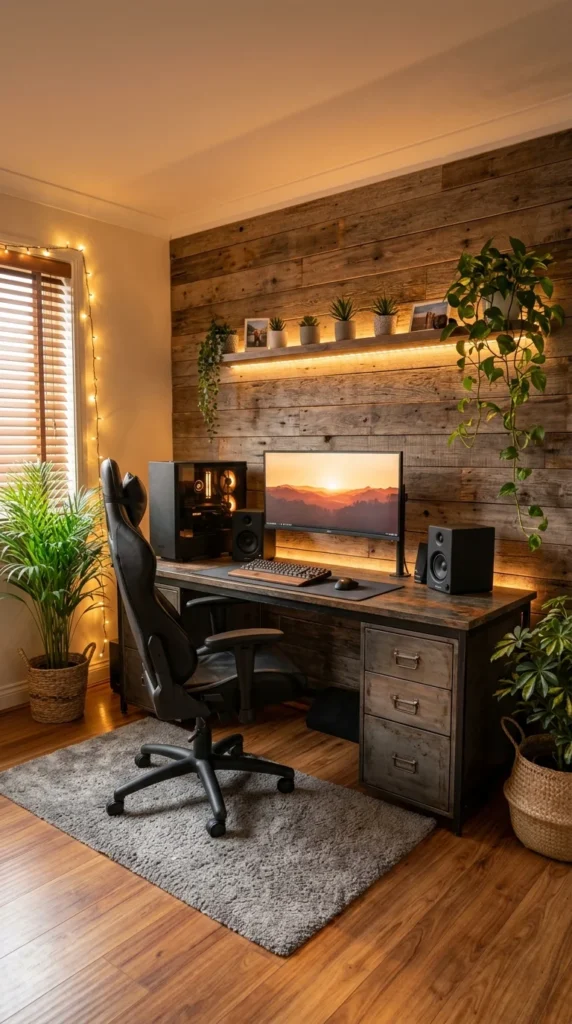
4. The Reclaimed Wood, No-RGB Setup
Not every gaming setup needs neon. This one skips the RGB entirely and leans on a reclaimed wood accent wall, warm string lights, and a small forest of plants to build atmosphere instead — proof that “gaming aesthetic” doesn’t have to mean glowing strips. The industrial filing cabinet desk with metal handles is doing quiet double duty as storage, which matters more than it sounds once cables, controllers, and accessories start piling up. Most rooms get this wrong by treating plants as an afterthought, but here they’re placed at both ends of the desk, which balances the composition without needing a second light source. The one thing worth flagging: live plants near a PC case need airflow clearance, and a couple of these are close enough to the vents that dust and leaf debris could become a real cleaning chore over time.
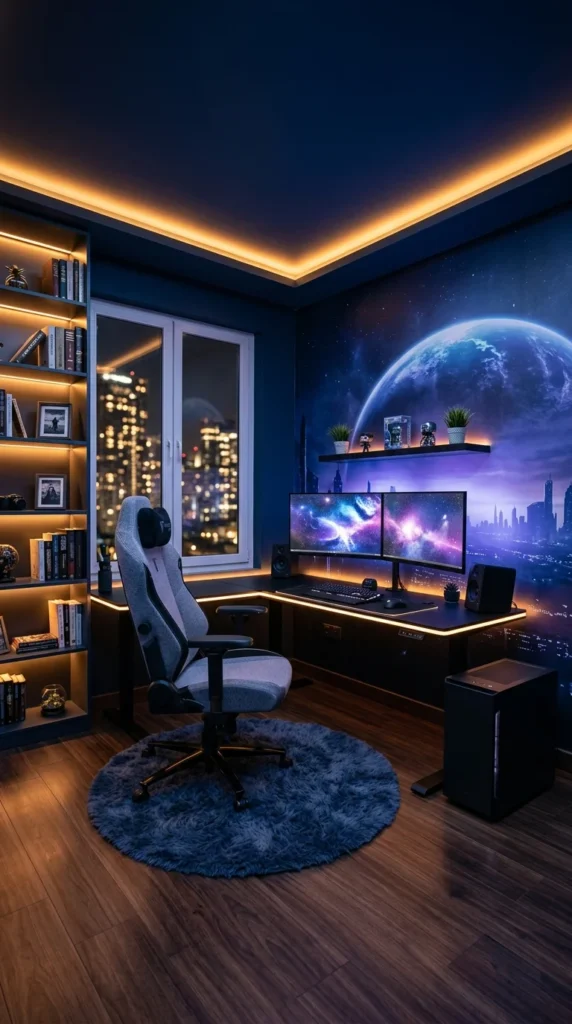
5. The Space Mural Setup
This is the most theatrical room so far, and it earns it. That full-wall space mural does the job three separate LED strips did in earlier setups — it sets mood without a single extra light source needed beyond the warm ceiling cove. What’s easy to miss here is the bookshelf on the left, quietly working against the sci-fi theme by keeping the room grounded in something tactile and real, not just screens and glow. Dual curved monitors on a corner desk also make smart use of an awkward angle, something the L-shaped setup from earlier solved with space – this one solves it with geometry. It’s an honest tradeoff, though: a mural this specific and bold is not something you can casually repaint or swap out in six months when the theme feels dated, unlike RGB lighting you can just reprogram.
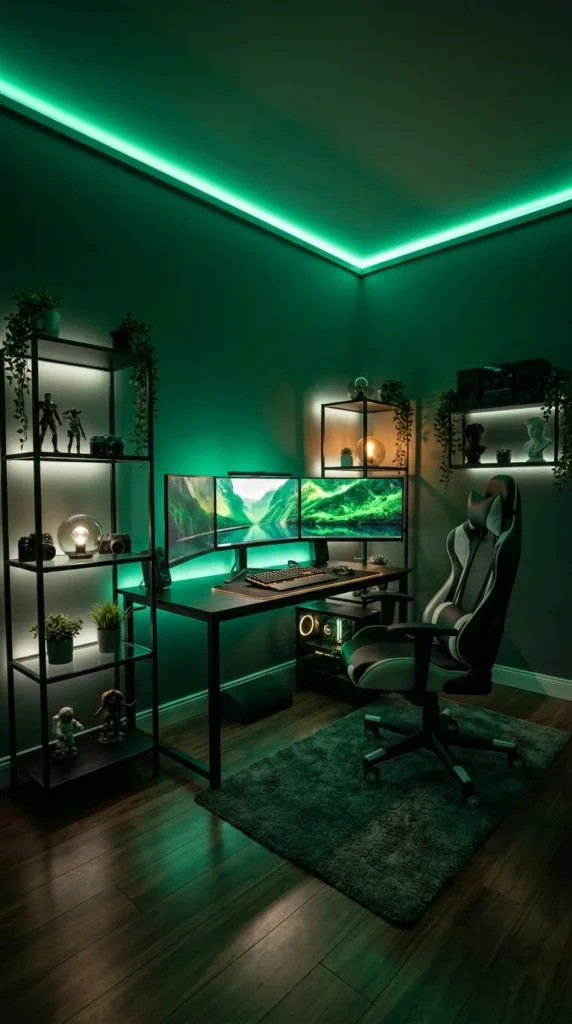
6. The Triple-Monitor Green Room
This one is not subtle, and it does not try to be. The entire ceiling perimeter glows green, and unlike the softer under-shelf lighting in earlier setups, this is the room’s main light source — which changes how everything else reads. Triple monitors on a single desk take real commitment, both in desk depth and in the kind of games or work that actually benefits from that width. The open metal shelving on both sides functions almost like a display case, holding figures and small lit accents that keep the eye moving instead of locking onto the desk alone. That is the whole idea here — atmosphere first, function second. Worth knowing before you copy it: saturated colour lighting like this green can distort how colours look on your monitor, so anyone doing colour-sensitive work or wanting true-to-life visuals will want a neutral light option nearby.
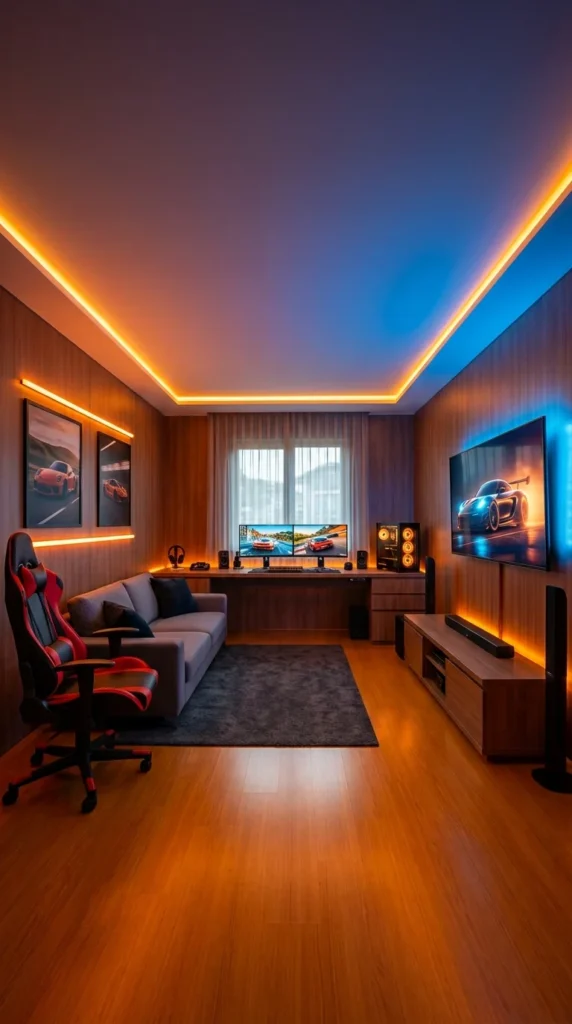
7. The Dual-Zone Media and Gaming Room
This is basically two rooms pretending to be one. On the left, a desk setup for focused, seated gaming; on the right, a wall-mounted TV with a soundbar and floor speakers for console play from the couch. It is a genuinely practical split, especially compared to the couch-and-desk combo from earlier — here the two zones do not compete for the same sightline, so neither setup feels like an afterthought. The warm orange ceiling trim on one side and cool blue on the other is a subtle way of marking each zone without needing walls or furniture to do it. Racing-themed wall art and the car footage on both screens tie the whole room to one interest, which is a small but effective consistency touch. The real question is space: this layout needs a genuinely long room, and most bedrooms converted into gaming spaces simply do not have the depth to separate a desk zone from a couch zone this cleanly.
8. The Living Room Corner Setup
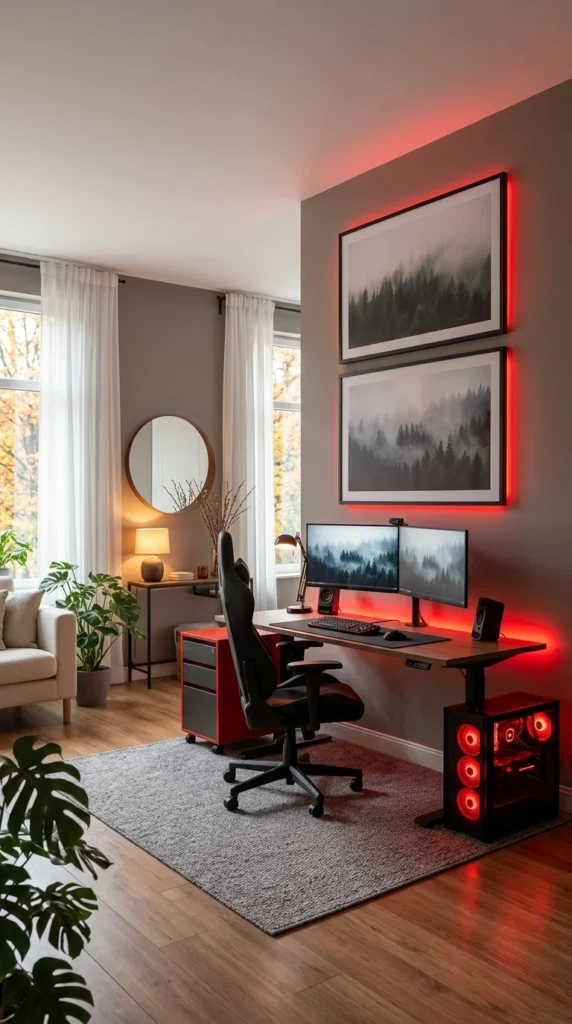
Unlike every setup so far, this one is not in its own dedicated room — it is carved out of a shared living space, tucked next to a couch, a mirror, and curtained windows that let in actual daylight. That constraint is exactly what makes it worth including. The red LED wash behind the artwork does the job a whole feature wall did in the space-mural setup earlier, but at a fraction of the commitment, since it is just a light strip, not a mural. Framed forest prints double the monitors’ misty visuals above the desk, tying the wall art and screen content together in a way that feels intentional rather than coincidental. If you are renting or sharing a living room with a partner who does not want a full “gaming room” aesthetic everywhere, this is the realistic template — a red-glow PC case and a couple of posters, not a full room takeover. The tradeoff: without a door to close, the red glow and case lighting are visible from the rest of the living room, so it only works if your household is fine with that.
9. The Coral Wall, Lounge Chair Setup
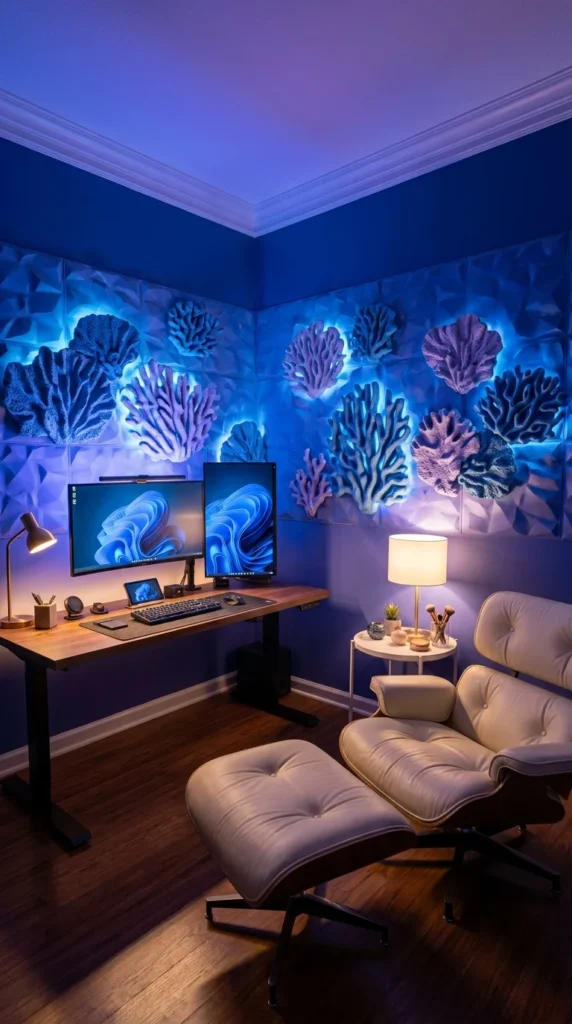
What is a gaming setup without a single gaming chair in sight? This room answers that question by swapping the racing-style seat for a leather lounge chair and ottoman, which changes the whole feel of the space from “battlestation” to something closer to a study. The sculpted coral wall panels are the real centrepiece, backlit in blue so they read almost like an aquarium installation rather than typical wall decor. Where the green triple-monitor room used lighting for pure atmosphere, this one uses it to highlight actual texture and craftsmanship in the wall itself. A small side table with a warm lamp breaks up the cool blue tone, giving your eyes somewhere to rest that isn’t screen-lit. This is a setup built for someone who games occasionally but wants the room to function as a reading or relaxing space the rest of the time — not a dedicated six-hour-session command centre.
10. The Triple-Monitor Corner With a Bean Bag
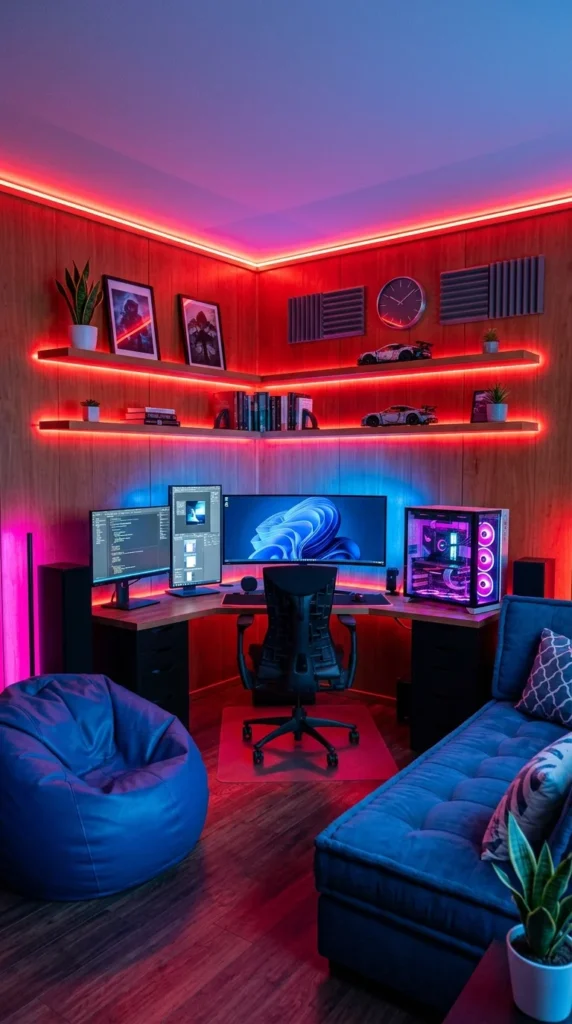
Full circle — the last setup goes back to a triple-monitor build but with a completely different mood than the green room from earlier. Warm wood panelling under all that red and blue light keeps this from feeling as cold as some of the earlier neon rooms, and the corner-desk layout maximises screen real estate without eating the whole room, similar logic to the space-mural setup but executed with more monitors and less mural. What actually caught my eye were the acoustic foam panels mounted next to the shelving — a genuinely practical touch for anyone gaming with a mic or headset and something none of the other nine rooms bothered to include. The beanbag chair off to the side is the small honest detail here: it signals this room hosts a second person sometimes, not just a solo setup. If there’s a downside, it’s that three visible cable runs behind the monitors suggest cable management wasn’t fully solved – proof that even a well-styled room can still have that one unfinished corner.
Conclusion
Ten rooms, ten completely different approaches, and one pattern worth remembering: the setups that hold up longest are rarely the ones chasing the most lighting effects. They’re the ones solving a real constraint – a shared living room, a narrow desk footprint, and a need for actual acoustic treatment. The flashiest photo isn’t always the smartest room to copy.
If you’re starting from scratch, don’t chase a whole aesthetic on day one. Pick one element that solves your actual problem — better cable routing, a warmer light temperature, or a chair that won’t wreck your back after hour three — and build outward from there. The best gaming setups, like the best any room, are the ones that still feel good to sit in on a random Tuesday afternoon, blinds open, nothing curated. That’s the real test every photo skips.
FAQs
1. Do I need RGB lighting to make my gaming setup look good? No. Sections 4 and 9 in this roundup prove that warm wood tones, plants, and a single accent light can create just as much atmosphere as a full RGB strip setup — sometimes with less maintenance and a more timeless look five years from now.
2. What’s the most budget-friendly setup style from this list to recreate? The living room corner setup (Section 8) is the most realistic for renters or shared spaces — it only needs an LED strip behind two framed prints and a PC with case lighting, not a full room takeover or custom furniture.
3. How do I stop my “inspiration” setup from becoming a maintenance headache? Pick materials based on your actual habits, not just the photo. Glossy desks and all-white gear (Sections 1 and 2) look flawless on day one but show fingerprints and grime fast – a matte or darker finish holds up better if you’re not wiping the desk down daily.
One Response